How to Make Printable QR Code Stickers That Scan
To make printable qr code stickers that scan, start with a working link and generate a high-quality QR code. Place it on a light background with a clear blank border. For close-range phone scanning, make the code at least 2 cm by 2 cm, then print a sample and test it on the surface where it will be used before ordering a full run.
A sticker can look sharp on a screen but fail once it is printed, cut, or placed on a curved package. The right size, material, and finish help keep the code readable.
I'm Jessica Gutowski-Slaydon, president of Swift Printing in Grand Rapids. My work with labels, variable-data printing, and print proofing helps me guide customers through the practical choices behind printable qr code stickers.
Core Mechanics: How QR Code Decals Bridge Print and Digital
Quick Response (QR) codes are two-dimensional matrix barcodes engineered according to ISO 18004 standards. Unlike traditional one-dimensional linear barcodes that store information horizontally across black and white lines, a 2D matrix encodes alphanumeric data across both horizontal and vertical axes. This grid structure allows smartphones and dedicated optical sensors to decode rich datasets, including complex URLs, digital contact cards (vCards), secure payment portals, and encrypted credentials.
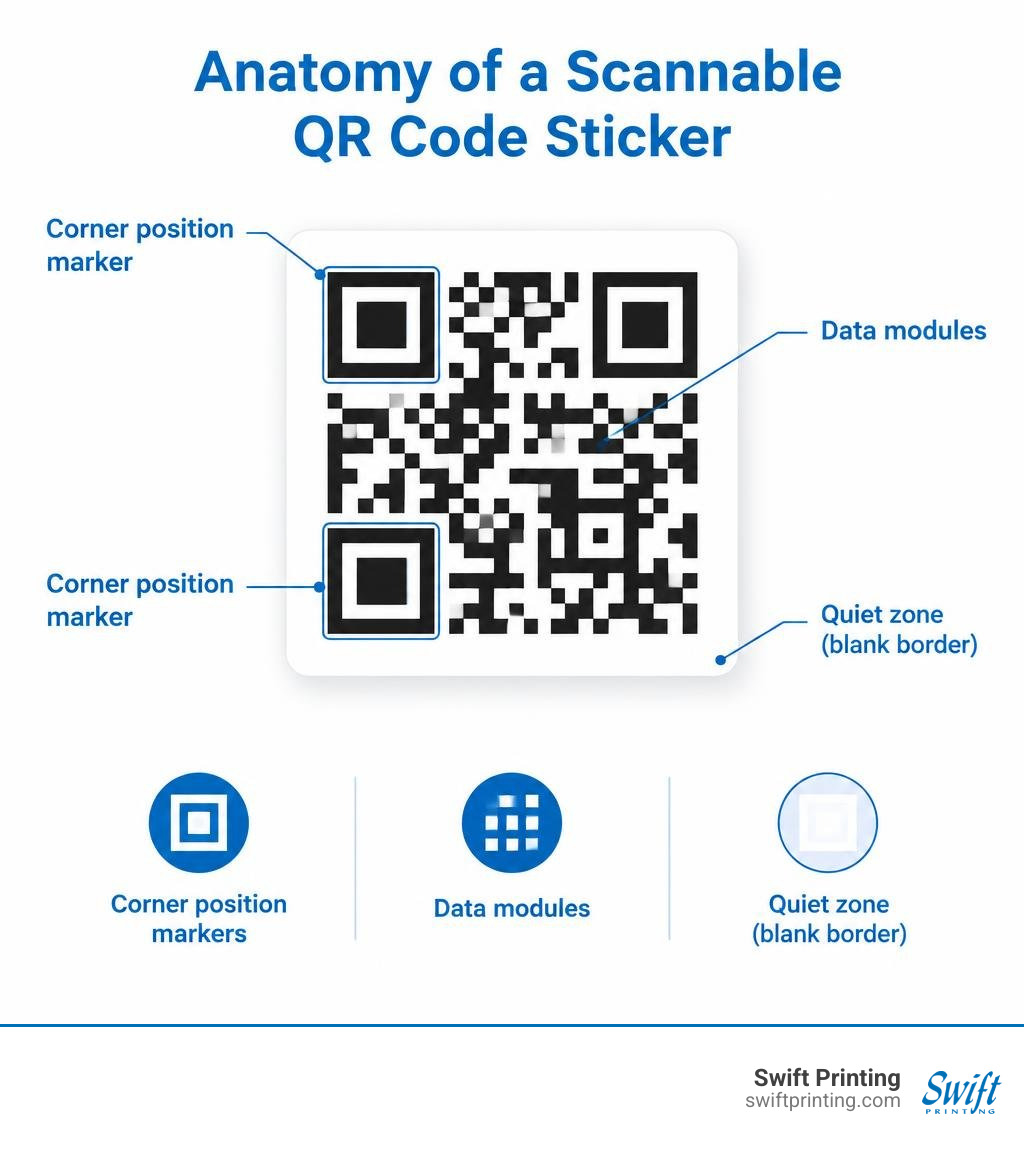
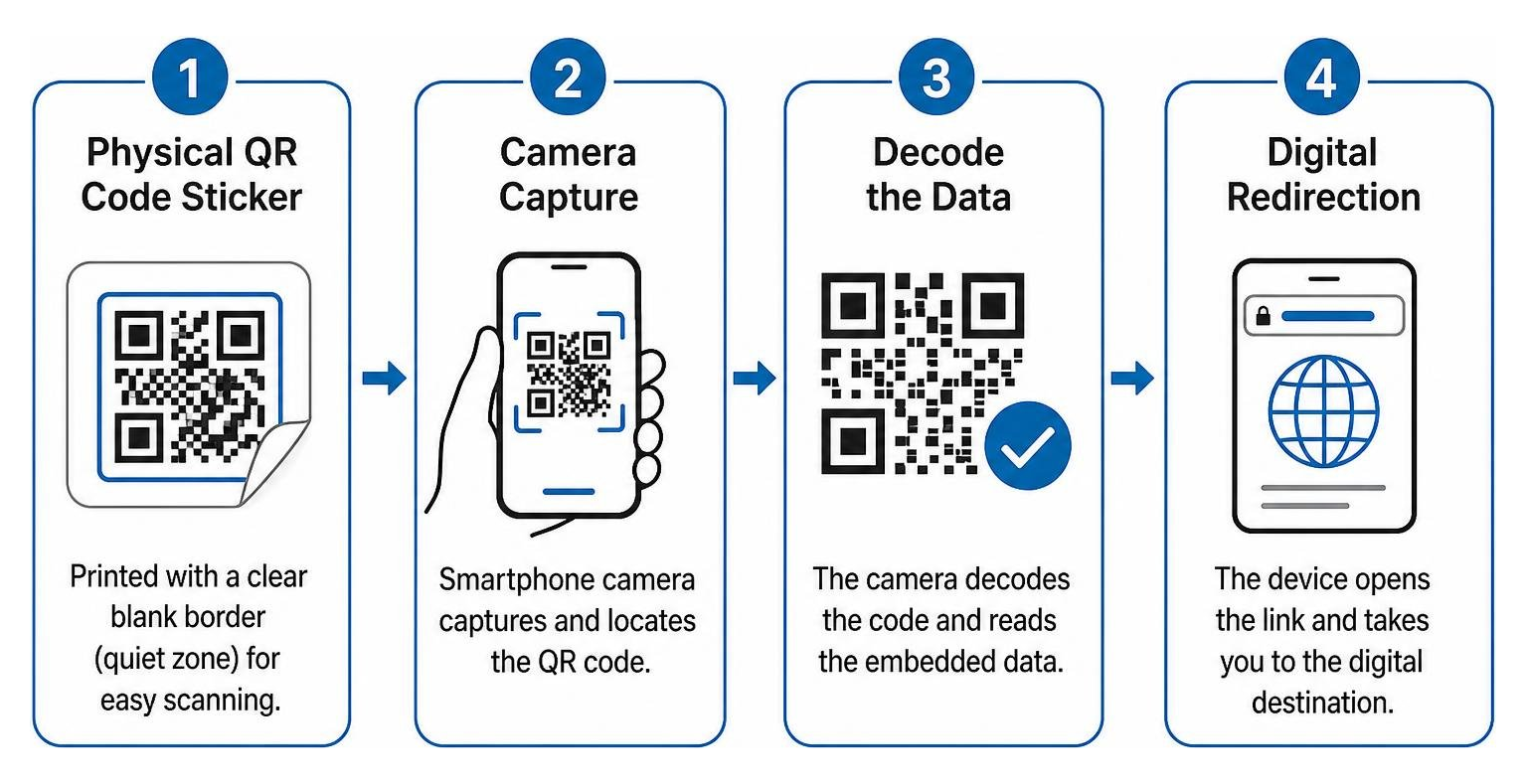
When a client or patient points their smartphone camera at a sticker, the optical sensor locates three distinct square position patterns located in the corners of the grid. These position markers orient the decoder software regardless of the angle, rotation, or tilt of the device. Once aligned, the camera rapidly decodes the alternating light and dark modules, translating those binary blocks into an actionable destination link.
Achieving instant recognition requires clear optical clarity across every physical pixel. Whether you are distributing corporate literature or launching product lines, understanding the value of integrating QR codes into printed collateral ensures your physical pieces reliably launch your digital channels.
Static vs. Dynamic Printable QR Code Stickers
When preparing decals for commercial production, selecting the correct code structure determines your post-print flexibility:
- Static QR Codes: The destination data is hardcoded directly into the geometric pattern. Because the matrix stores the entire raw address, longer web links create dense, highly clustered module patterns. Once printed, a static code cannot be modified. If a webpage changes or a document moves, the physical sticker cannot be updated. Static codes are suitable for permanent, unchanging data such as Wi-Fi network credentials or simple text strings.
- Dynamic QR Codes: The matrix encodes a short redirect URL pointing to a secure server. That routing server instantly forwards the user to your final target destination. This architecture allows you to update the destination web address at any time without changing or reprinting the physical decal. Dynamic setups also allow detailed campaign tracking, logging scan counts, device operating systems, general geographic areas, and timestamps.
| Feature | Static QR Code Stickers | Dynamic QR Code Stickers |
|---|---|---|
| Link Editability | Permanent (cannot be changed) | Editable anytime via server redirect |
| Tracking & Analytics | Limited (requires pre-set URL UTMs) | Real-time scan metrics, device data, location |
| Matrix Density | Increases with character length | Always compact (uses short routing link) |
| Best Professional Use | Permanent Wi-Fi logins, fixed contact info | Client onboarding, case files, event marketing |
Essential Material Selection for Printable QR Code Stickers
A QR decal must remain physically intact to stay readable. If the printed pattern scratches, peels, smudges, or degrades from moisture, the optical scanner cannot complete its error-correction calculations. Choosing high-grade materials and adhesive formulations ensures your graphics perform dependably on high-value corporate items, medical equipment, or direct-mail packages. Exploring premium commercial label printing allows organizations to select custom materials tailored to specific environmental demands.
Substrate Durability: Vinyl, BOPP, and Synthetic Stocks
Different environments require specialized substrate foundations:
- Cast and Calendered Vinyl: Vinyl provides excellent dimensional stability and flexibility. It conforms smoothly to mild surface curves without lifting at the edges. Paired with outdoor-grade UV inks, premium vinyl stickers maintain readability for 3 to 5 years in exterior settings, resisting direct sunlight, rain, and temperature fluctuations.
- Biaxially Oriented Polypropylene (BOPP): White BOPP film is an industry standard for packaging and product labeling. It offers exceptional resistance to water, oils, and commercial cleaning agents. BOPP provides a stable, opaque white base that maintains crisp module edges.
- Synthetic Polyester and Coated Papers: Synthetic polyesters excel in high-durability office or clinic settings, resisting abrasion and continuous handling. For short-term indoor applications, such as temporary conference passes or single-use presentation inserts, coated semi-gloss paper stocks paired with lay-flat split-back liners provide clean, reliable presentation.
When evaluating materials for your project, reviewing our detailed look at specialized QR code sticker paper helps balance tactile feel with daily physical durability. Design teams can also reference the Adobe Express sticker design guide to explore layout ideas and export specifications before physical production.
Surface Finishes: Matte vs. Glossy Laminates
The protective laminate applied over the printed ink affects both surface durability and optical scanning performance.
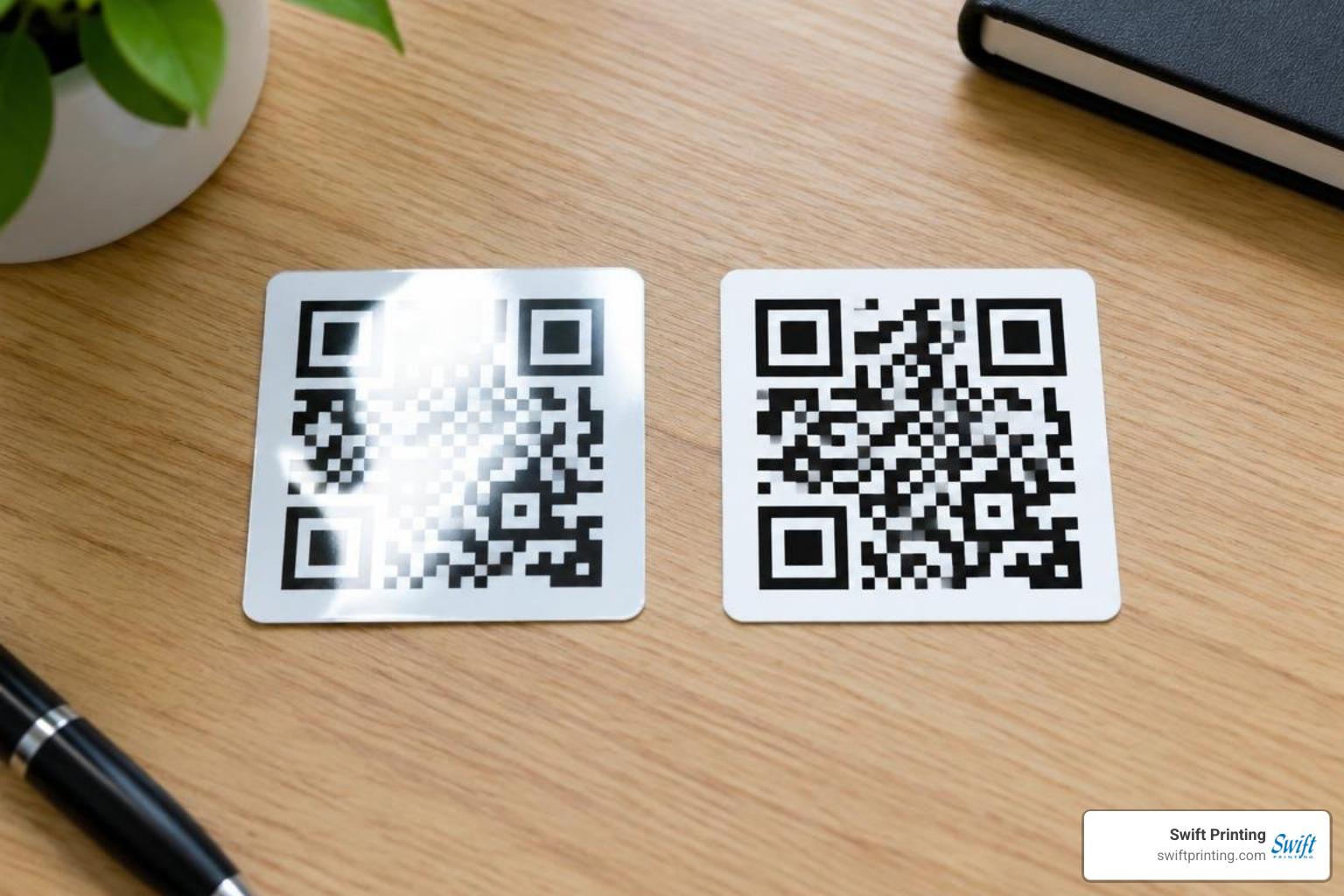
High-gloss laminates deliver deep color saturation, but they can act like a mirror under direct sunlight, office fluorescent tubes, or camera flash units. This specular reflection blinds smartphone camera sensors, washing out the pattern and causing focus failure.
A velvet or satin matte laminate finish diffuses light evenly across the face of the decal. Matte finishes eliminate harsh reflections, allowing mobile lenses to register contrast and decode data instantly from multiple angles. For professional services firms and healthcare practices, matte finishes also provide an elegant, refined look that avoids cheap plastic glare.
Sizing, Contrast, and Design Rules for Flawless Scannability
Every successful QR code deployment relies on strict geometric and optical principles. If a file lacks sufficient module definition or contrast, smartphone operating systems will struggle to register the target.
Minimum Physical Dimensions and Quiet Zones
To ensure consistent scanning at close range (such as arm's length on desktop files, retail packaging, or consulting folders), keep the physical matrix to a minimum size of 2 cm × 2 cm (approximately 0.8 × 0.8 inches). For items scanned from greater distances, such as trade show booth backdrops or window displays, scale the code upward using standard viewing distance ratios.
Along with overall dimensions, you must preserve the quiet zone. This is the solid, uninterrupted blank margin surrounding all four outer edges of the QR matrix.
Never allow background graphics, text, container borders, or die-cut trim lines to encroach upon this border. If the decal is applied to a clear glass jar or dark surface, an opaque white ink underbase must be printed directly behind the code and quiet zone to prevent the background color from bleeding through.
Custom Logos and High-Contrast Brand Palettes
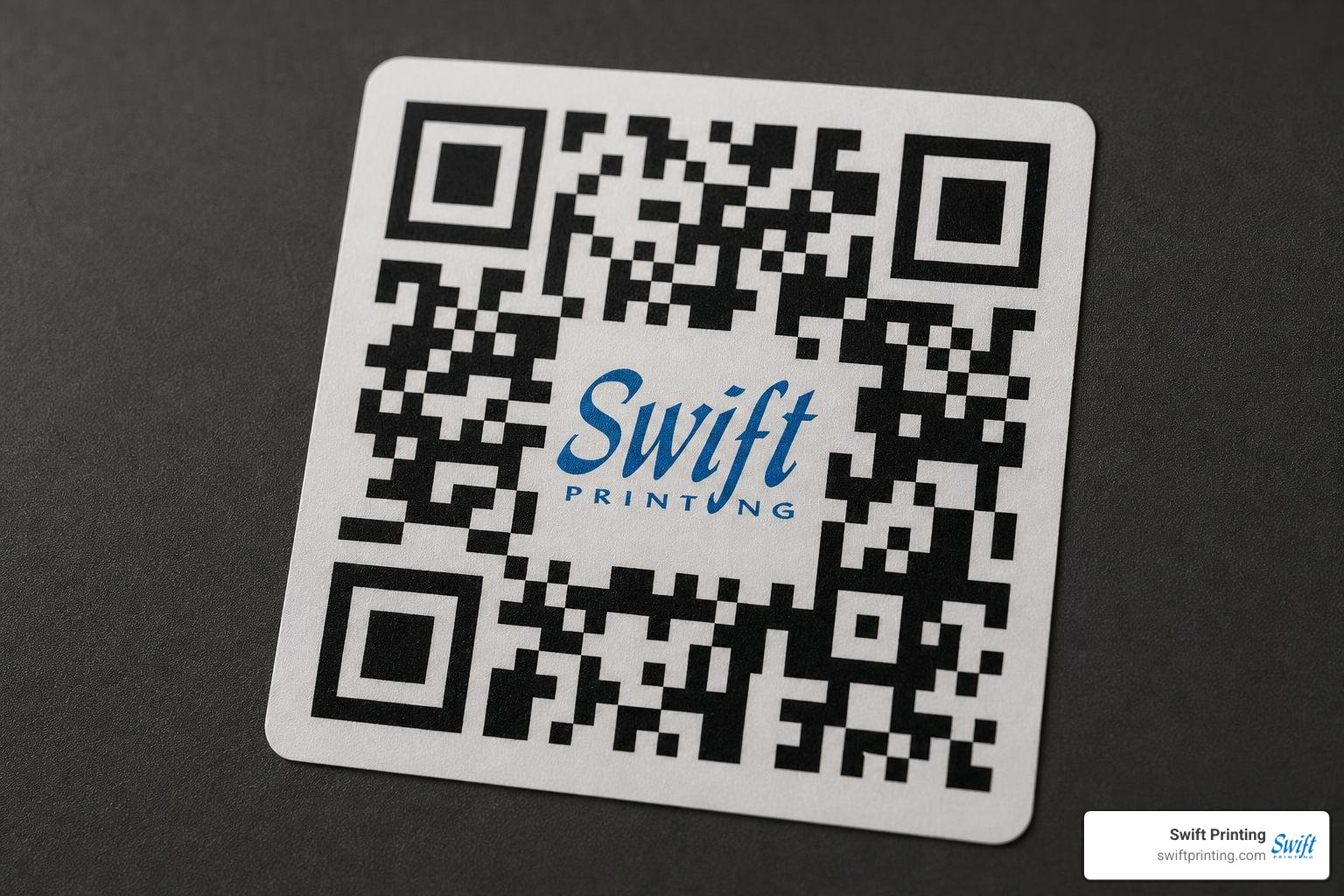
Incorporating a company mark or brand color scheme requires balancing aesthetics with optical physics:
- Maintain at Least 40% Contrast: Always place dark modules against a light, uniform background. Never invert the design by placing light modules on a dark background; many smartphone scanner engines expect the positional markers to be darker than the background field.
- Use Error Correction Level H for Logos: QR standards support four error-correction levels (L, M, Q, H). When embedding a brand icon in the center of the code, use Level H (High). Level H restores up to 30% of obscured or missing data modules, allowing the phone to reconstruct the link even when the logo covers part of the grid.
- Preserve the Three Corner Position Markers: Keep the three primary square position markers entirely clear of artwork, gradients, and icons.
- Prepare Color for Print in CMYK: Convert screen designs from RGB to commercial CMYK. On digital presses, use pure 100% K (monochrome black) for sharp, fine line edges, avoiding heavy four-color rich black combinations that can misregister on microscopic module corners.
Step-by-Step Production: Preparing and Printing Custom Decals
Follow this structured workflow to move from raw data to finished, commercial-grade decals:
- Generate and Validate Your Destination Link: Build your destination URL with any required analytics parameters, then verify that the link resolves correctly without redirects or broken links.
- Export Vector Master Artwork: Export your QR symbol in vector format (SVG or EPS). Vector files scale cleanly to any size without pixelation or soft edges. If using raster formats, export at a minimum of 300 to 600 DPI at 100% final physical scale.
- Set Up the Print-Ready Layout: Place the vector artwork into your layout software with a 4-module quiet zone, convert colors to CMYK, and add a standard 3 mm (0.125 inch) bleed margin outside the cut line.
- Choose Substrate and Protective Overlaminate: Pair your base film (such as tear-proof vinyl or BOPP) with a non-reflective matte protective laminate suited to your indoor or outdoor environment.
- Print a Hard-Copy Proof: Review a physical proof sheet at actual size under natural and indoor lighting. Scan the printed proof using both iOS and Android cameras before starting the full run.
- Precision Digital Die-Cutting: Cut the finished sheets or individual decals using digital contour knives with smooth paths to prevent edge fraying or adhesive oozing.
For a deeper look into file setup and production, follow our comprehensive step-by-step print QR code stickers guide.
Batch File Setup and Multi-Label Layouts
For large projects, variable data printing (VDP) allows each individual sticker on a sheet or roll to carry a unique, serialized QR code.
- Format a clean spreadsheet (such as a CSV file) with one distinct URL, asset identifier, or client code per row.
- Link the data source into your pre-press layout engine using dynamic data merge tools.
- Lock print drivers to 100% actual size, avoiding automatic "scale to fit" settings that alter label dimensions and misalign pre-cut sheets.
Desktop Proofing vs. Commercial Boutique Printing
While desktop office printers can handle quick black-and-white proofs on standard paper, they face limitations when producing high-wear corporate decals:
- Desktop Limitations: Desktop inkjet inks remain water-soluble and smear easily when exposed to moisture or hand oils. Office laser toners can flake or crack along tight cutlines. In addition, desktop sheet-feed rollers often shift slightly during printing, causing the cut path to drift into the quiet zone.
- Commercial Boutique Press Standards: Professional digital presses apply UV-cured or high-density pigment inks that chemically fuse to synthetic films. In-line spectrophotometers maintain consistent contrast across thousands of units, while computerized optical registration systems align contour cuts with sub-millimeter precision.
Strategic Applications for Professional Services and Premium Packaging
Custom QR decals allow organizations to deliver digital experiences from physical touchpoints:
- Legal Practices: Affix tamper-resistant decals to active case archives, discovery document folders, or corporate binders, giving legal teams instant, secure access to cloud-based document repositories.
- Medical Clinics and Healthcare Providers: Place matte, chemical-resistant decals on patient room signage, onboarding kits, and diagnostic hardware to direct patients to secure portals, telehealth check-ins, or post-operative care guides.
- Consulting and Accounting Firms: Add branded decals to quarterly audit presentations, corporate proposals, and executive binders, connecting decision-makers directly to interactive data dashboards and video briefings.
- Boutique Manufacturing and Luxury Packaging: Enhance high-end unboxing experiences by applying clean decals that link to product provenance, material sourcing disclosures, or digital authentication certificates.
- Corrective Overstickering: Update URLs or contact information on existing print collateral by placing a fresh decal directly over obsolete information, extending the life of your marketing materials without reprinting entire runs.
Frequently Asked Questions About Printable QR Code Decals
Can I update the link on a QR code sticker after it has been printed?
Yes, provided you created the sticker using a dynamic QR code. Dynamic systems use a centralized short routing URL that redirects scanners to your chosen destination. You can log into your management dashboard at any time to update the target webpage, document, or form without changing the printed graphic. If the decal was printed as a static code, the destination is hardcoded into the physical ink pattern and cannot be changed.
What causes a printed QR code sticker to fail when scanned?
The most common issues include:
- Missing or Crowded Quiet Zone: Placing text, borders, or cuts too close to the matrix edge prevents the scanner from isolating the code.
- Surface Glare: High-gloss laminates reflect light from overhead lamps or the sun, obscuring the pattern.
- Low Contrast: Using light-colored modules, soft pastel backgrounds, or inverted color schemes (light on dark).
- Resolution Distortion: Printing low-resolution raster images (such as web-resolution 72 DPI JPEGs) that blur module corners.
- Surface Warping: Applying a large, flat sticker over a tight compound curve or deep ridge, which distorts the grid pattern.
What is the minimum recommended size for a QR code sticker?
For standard close-range smartphone scanning, maintain a minimum matrix size of 2 cm × 2 cm (0.8 × 0.8 inches), not including the outer quiet zone margin. If the encoded web address is exceptionally long or if the sticker will be viewed from several feet away, increase the physical size to preserve readability.
Conclusion
A well-crafted QR code sticker combines clean graphic design, solid data architecture, and careful material selection. Ensuring high visual contrast, preserving clear margins, and selecting durable, non-reflective matte materials will keep your decals scanning quickly and reliably across every project.
At Swift Printing, we set the standard for high-end boutique commercial printing in Grand Rapids, Michigan. We partner closely with professional services firms, medical practices, and businesses across West Michigan, Rockford, Ada, Belmont, Kalamazoo, and Lansing. If you are preparing your next print run and want to make sure your files are set up correctly from the start, learn more about how to make a QR code or connect with our team for personalized file proofs and material recommendations.