A Practical Guide to Compare Label Printing Options
Comparing Label Printing Technologies: Direct Thermal, Thermal Transfer, Inkjet, and Digital Press
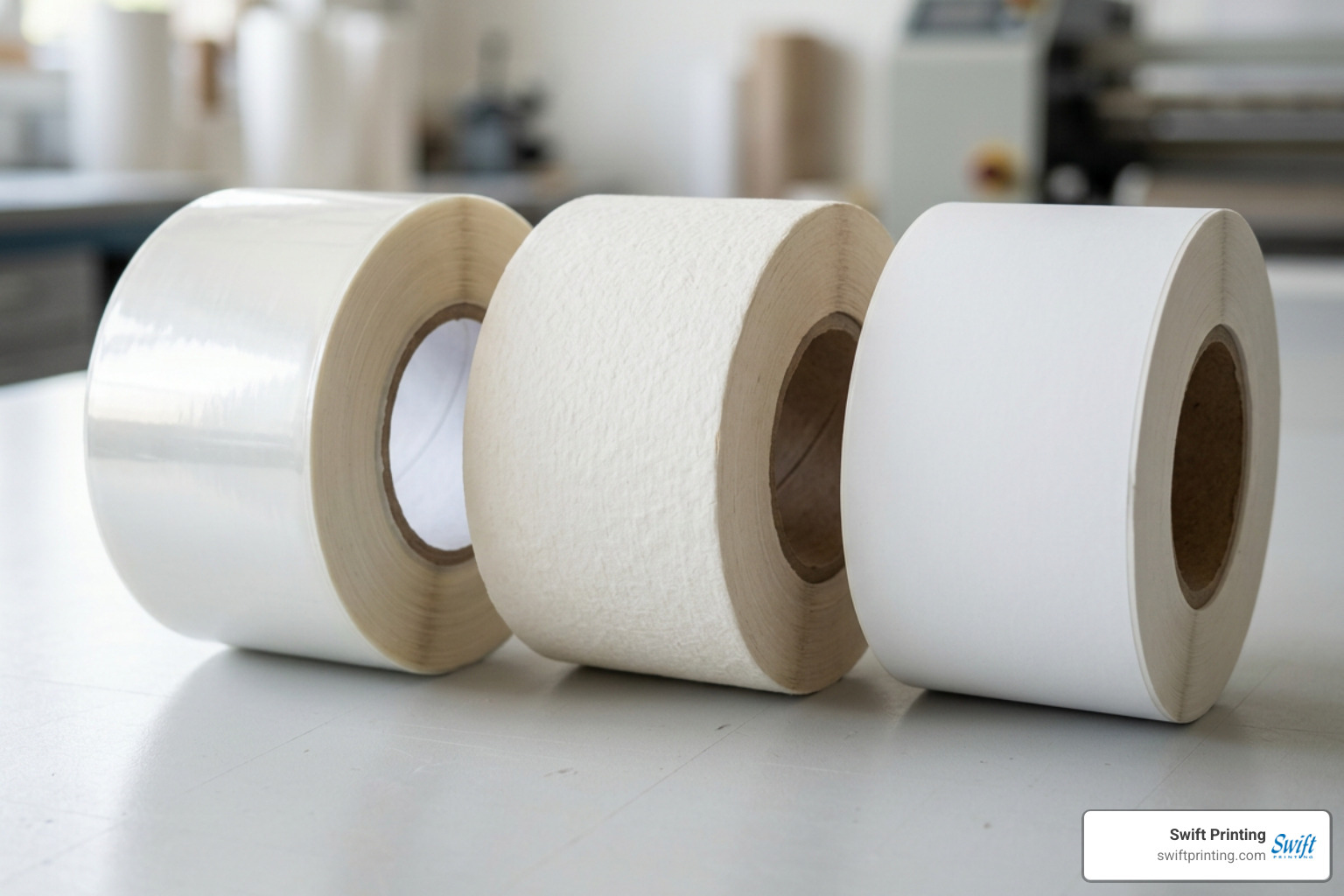
Finding the right printing engine means weighing up-front equipment costs against speed, image fidelity, and long-term durability. When you look at digital printing versus dedicated monochrome thermal systems or traditional offset printing, each setup serves a distinct operational purpose.
| Technology | Best Use Case | Typical Resolution | Ink / Ribbon Needed? | Durability Level | Relative Cost per Label |
|---|---|---|---|---|---|
| Direct Thermal | Shipping labels, receipts, temporary visitor badges | 203 to 300 DPI | No (uses chemically treated heat-sensitive media) | Low (fades with heat, light, and friction) | Very low operational cost |
| Thermal Transfer | Asset tracking, warehouse bin tags, outdoor labeling | 203, 300, or 600 DPI | Yes (wax, wax-resin, or pure resin ribbon) | High to extreme (chemical, UV, and scratch-resistant) | Low to moderate |
| Desktop Inkjet | Short-run craft product labels, home office address sheets | Up to 1200+ DPI | Yes (liquid dye or pigment ink cartridges) | Moderate (requires water-resistant or coated stock) | Moderate to high ink cost |
| Desktop Laser | Sheet-fed multi-up mailing labels, office filing | 600 to 1200 DPI | Yes (dry toner cartridges with heat fuser) | Moderate (good smudge resistance on paper) | Moderate per-sheet cost |
| Commercial Digital Press | High-volume retail packaging, cosmetics, food jars | 1200 to 2400 DPI | Yes (industrial toner or UV-curable inkjet) | Very high (matched with professional varnishes/laminates) | Lowest unit cost at scale |
Direct Thermal vs. Thermal Transfer for Logistics and Inventory
The primary difference between direct thermal and thermal transfer printing lies in how heat creates the image. Direct thermal printers utilize a heated printhead that applies energy directly to a chemically treated, heat-sensitive substrate. Because no ribbon is required, direct thermal systems offer straightforward mechanics with fewer moving parts to load. However, the resulting print remains chemically reactive. Exposure to direct sunlight, high warehouse temperatures, or abrasive rubbing will cause the facestock to turn black or fade entirely over time.
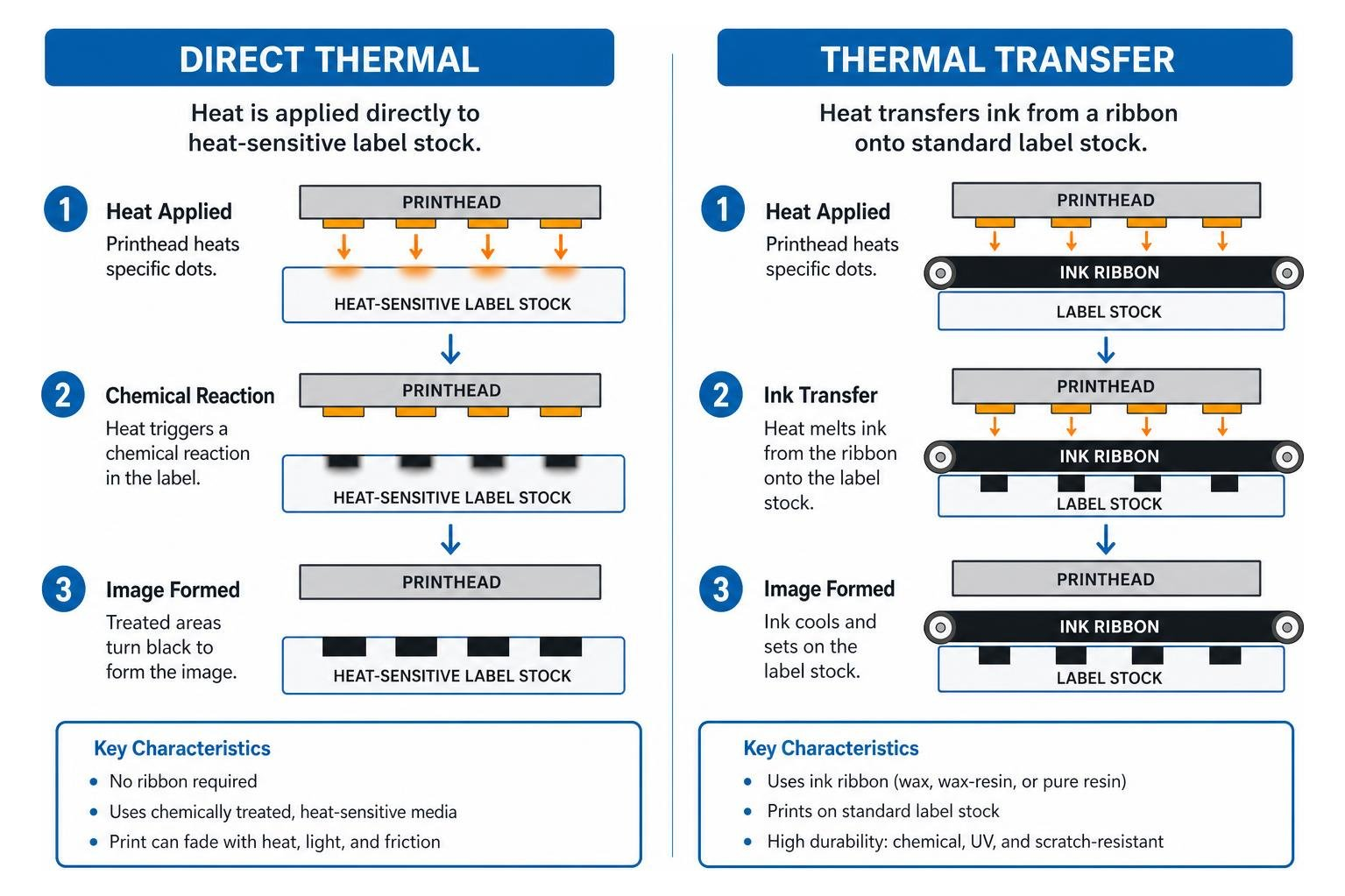
Thermal transfer printers solve the longevity problem by using the printhead to melt a specialized ink ribbon onto standard label stock. Depending on the operational environment, businesses choose among three primary ribbon chemistries:
- Wax Ribbons: Ideal for standard paper shipping tags and indoor carton labeling where basic scratch resistance is sufficient.
- Wax-Resin Combinations: Deliver crisp, moisture-tolerant prints on coated papers and semi-gloss synthetic films.
- Pure Resin Ribbons: Formulated for extreme environments, pairing with polyester or polyimide films to withstand industrial solvents, chemical baths, outdoor UV exposure, and freezer warehousing.
High-Resolution Inkjet, Laser, and Commercial Digital Presses
When packaging demands full-color branding, photo-quality product photography, or complex regulatory layouts, monochrome thermal printers step aside for multi-color print engines. Desktop inkjet printers use liquid ink droplets to achieve vibrant, continuous-tone graphics. They excel for small artisan batches, though moisture-sensitive dye inks must be paired with specialized inkjet-receptive coated facestocks to prevent bleeding.
Desktop laser printers rely on electrostatically charged dry toner fused to sheet-fed media using intense heat. Laser sheets provide crisp typography for address labels, but the high heat of the fuser unit means you must only use laser-compatible adhesives to prevent sticky gum from melting inside your machine.
For growing commercial brands, industrial digital presses eliminate desktop print bottlenecks entirely. High-resolution digital label production delivers tight registration, exact color matching, edge-to-edge full bleed trimming, and dynamic variable data printing without the expensive plate-making charges of traditional analog printing.
Material Substrates, Adhesives, and Blank vs. Pre-Printed Formats
A label's performance depends as much on what sits beneath the ink as the print engine itself. Sourcing the right material facestock and adhesive chemistry ensures your labels stay put through refrigeration, transport, and customer handling. To explore how eye-catching materials transform brand perception, take a look at Stick With It: The Power of Labels and Stickers.
Selecting the Right Substrate and Adhesive Type
Facestocks generally fall into two broad categories: natural paper stocks and synthetic plastic films.
- Matte Litho & Semi-Gloss Paper: Economical and easy to print, paper facestocks are the backbone of indoor shipping, carton tracking, and dry grocery packaging.
- Textured Estate Papers: Uncoated, textured stocks lend an artisanal, premium feel to wine bottles, gourmet sauces, and luxury cosmetics.
- Biaxially Oriented Polypropylene (BOPP): The gold standard for water, oil, and chemical resistance. Available in white, clear, and metallic finishes, BOPP is virtually tear-proof and conforms cleanly to squeezable bottles.
- Vinyl and Polyester: Heavy-duty synthetic films engineered for rugged outdoor equipment, instructional warning decals, and extended industrial use.
Pairing your substrate with the proper adhesive formulation prevents edge lift and adhesive failure:
- Permanent Acrylic: Bonds aggressively to cardboard, glass, rigid plastics, and metals. It cures over time to form a durable bond.
- Removable Adhesives: Formulated with lower initial tack, allowing clean removal from glass, housewares, and retail book covers without leaving gummy residue behind.
- Freezer-Grade Adhesives: Standard adhesives crystallize and lose tack when temperatures drop below 32°F ($0°C$). Freezer-grade formulations maintain strong grab down to -40°F (-40°C), making them essential for frozen foods, cold-chain logistics, and refrigerated pharmaceutical storage.
Blank Roll Labels vs. Pre-Printed Custom Labels
Choosing between blank roll stock and professionally pre-printed labels comes down to data variability and production efficiency.
Blank label orders for standard off-the-shelf dies typically ship within 1 to 3 business days. However, when orders require custom die tooling, timing registration marks on the liner backing, or exceed 1,000 total rolls, production lead times generally range between 4 to 6 business days. Selecting expedited freight services only speeds up transit time with the carrier; it does not shorten the physical manufacturing schedule required to tool and convert raw roll stock.
A popular hybrid strategy for growing businesses is purchasing pre-printed label shells featuring full-color brand artwork and logo treatments, then using an in-house thermal printer to overprint dynamic batch numbers, expiration dates, and variable barcodes on demand.
Barcode Compliance, Logistics, and Shipping Standards
Barcodes serve as the critical bridge between physical merchandise and digital inventory systems. A barcode that fails to scan creates immediate manual bottlenecks in distribution centers, leading to retail compliance chargebacks and shipping delays.
Generating Scannable Barcodes and 2D Matrix Codes
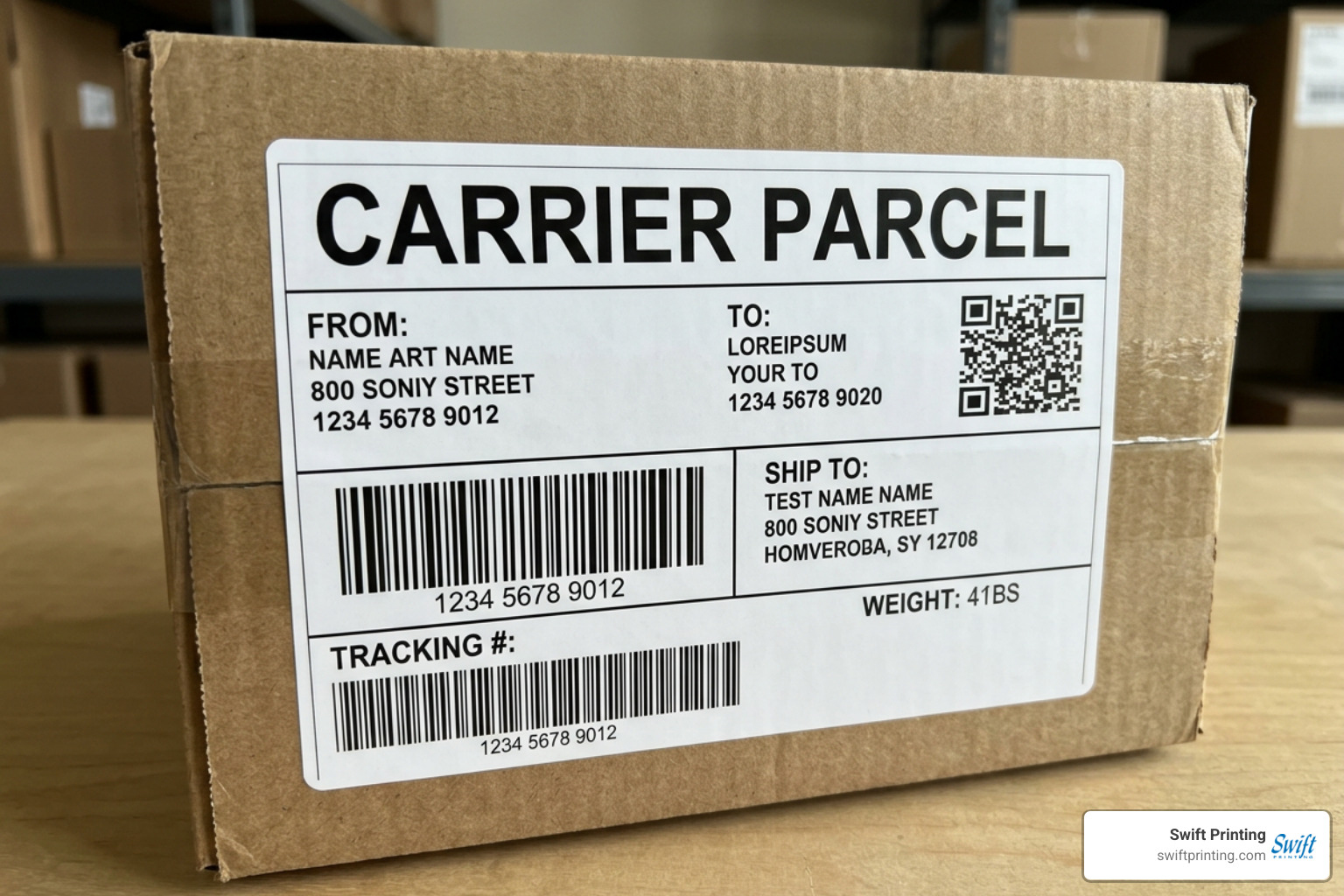
Generating dependable barcodes requires respecting physical print geometry. Linear 1D barcodes like CODE128 (standard for logistics and carton tracking) and UPC-A (retail point of sale) rely on precise bar-to-space ratios. If an image is stretched improperly, optical scanners cannot decode the pattern.
- Maintain Quiet Zones: Always leave clean, unprinted white space (at least 0.25 inches or 10 times the width of the narrowest bar) on both ends of a linear barcode.
- Render Native Vectors: Avoid pasting low-resolution bitmap images (like 72 DPI PNGs or JPEGs) into your layouts. Instead, utilize vector commands or native label design software that computes checksum digits automatically and scales lines cleanly to the printer's native dot grid.
- Incorporate 2D Codes: For interactive consumer campaigns, you can explore adding a QR code sticker to your packaging. If you are building one from scratch, our guide on How to Make a QR Code outlines the essential design rules for mobile scanning.
Free browser-based label design tools allow users to generate linear symbologies and 2D codes without installing heavy client-side drivers. These platforms often feature over 150 Google Fonts and include 30+ built-in label presets for thermal hardware brands like Zebra, Rollo, DYMO, and Brother. For straightforward browser drafting, tools like the Free Online Label Maker from mylabelmaker offer quick prototyping directly on your canvas.
Shipping Documentation and Carrier Label Requirements
Carrier parcel logistics run on standardized formats. The 4x6-inch label is the universal standard across major US carriers like UPS, FedEx, and the USPS.
When generating shipping documentation through carrier portals, ensure your browser settings allow pop-up windows and JavaScript execution so thermal print scripts render correctly. Air transport networks frequently rely on specialized Air Shipping Documents (ASD) that integrate routing instructions, safety declarations, and tracking barcodes into a single multi-part form. Furthermore, modern logistics hubs are pairing optical barcodes with embedded Radio Frequency Identification (RFID) label inlays, allowing high-speed automated facility routing without line-of-sight scanning.
For multi-channel e-commerce merchants, compliance requirements extend beyond parcel carriers:
- Amazon FBA FNSKU Labels: Require 1D barcodes (such as CODE128) measuring 2x1 inches or 1x3 inches, containing the exact merchant SKU and item condition, bordered by a defined quiet zone.
- FDA Nutrition Facts Panels: Food and beverage packaging labels must follow precise typographic sizing, daily value percentages, bold line dividers, and allergen disclosures compliant with federal regulations.
- GS1 Barcode Standards: Global supply chains require authentic GS1-issued company prefixes for retail UPC-A and carton-level GS1-128 serialized shipping container codes (SSCC).
Design Software, Automation, and Production Scalability
As printing volume grows from a dozen shipping tags a day to thousands of customized product labels, manual entry quickly becomes impractical. Automated label production links layout templates directly to active databases, eliminating human error.
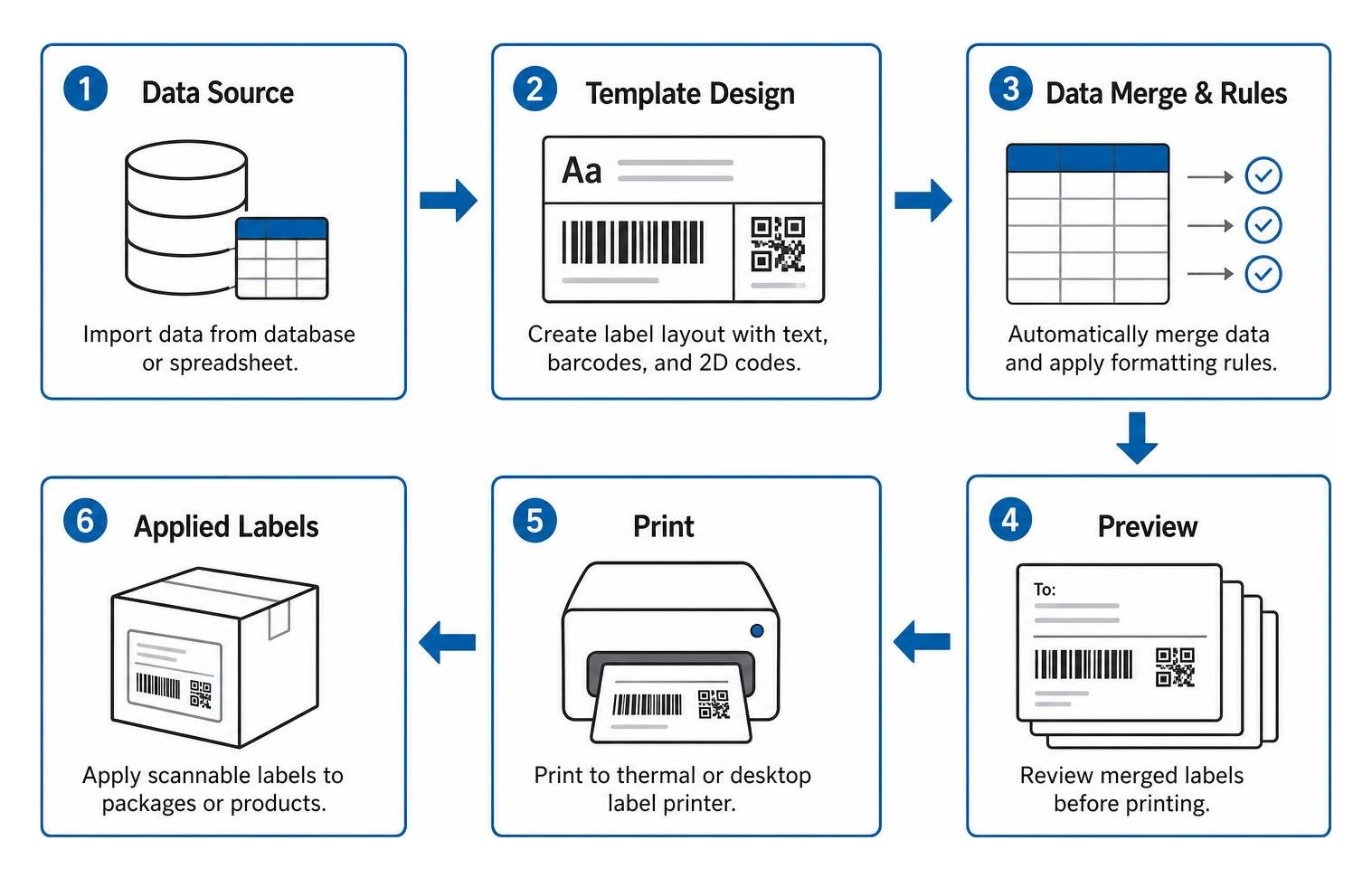
Software platforms offer different tiers of sophistication:
- Entry-Level Web Tools: Platforms like Avery Design & Print allow users to import contacts from Excel sheets to perform address mail merges for envelopes, folders, and multi-up sheet stock.
- Desktop Barcode Suites: Solutions like LABEL MATRIX barcode software support over 100 barcode symbologies and operate across 15 different languages. These programs bridge entry-level layouts with dynamic date offsets, real-time serialization counters, and direct thermal printer drivers.
- WYSIWYG Barcoding Platforms: Long-standing software such as Labeljoy barcode label software, which has supported commercial users for 20 years from 2006 to 2026, features over 11,000 pre-installed layout standards and direct database connections for instant price tag batching.
- Enterprise Print Automation: Advanced platforms like AzureLabel label software, trusted by over 2,000 businesses worldwide, come equipped with 3,000 pre-installed self-adhesive templates. They support auto-fitting dynamic text, REST APIs, and automated file-drop triggers that execute print runs the moment a point-of-sale or ERP system logs an order.
When your communication strategy pairs on-package labeling with addressed postal campaigns, coordinating your artwork with professional direct mail printing ensures your brand maintains a consistent visual standard across every touchpoint.
Automating Batch Label Printing Workflows
To set up an automated batch print process without enterprise-level costs, businesses frequently implement dynamic token mapping:
- Build a Master Template: Establish static design assets (such as background artwork and field headers) and insert dynamic token placeholders (like
{{SKU}},{{Description}},{{Price}}, and{{Barcode}}). - Connect the Data Feed: Link the template to a live CSV file, Google Sheets document, or SQL database table.
- Configure Layout Rules: Establish auto-fit boundaries so long product descriptions scale down cleanly in point size without overlapping adjacent barcode quiet zones.
- Deploy Automation Triggers: Use folder monitoring or API triggers to automatically process new batches as fulfillment teams generate pick lists.
Troubleshooting Common Thermal Label Printing Errors
When desktop thermal printers misbehave, the issue can usually be traced back to media, calibration, or driver settings:
- The Printer Outputs Completely Blank Labels: Verify whether you are using direct thermal or thermal transfer stock. You can test direct thermal paper by scratching the surface quickly with your fingernail; friction heat should draw a visible black line. If no mark appears, you have thermal transfer stock loaded in a printer without an installed ink ribbon.
- Labels Are Skipping or Stopping Mid-Feed: The optical gap sensor or black-mark sensor is likely misaligned or blinded by paper dust. Clean the sensor lens with isopropyl alcohol and run the printer's hardware gap calibration routine.
- Barcodes Fail to Scan: Blurry bar edges occur when a 203 DPI printer attempts to render high-resolution raster images rather than native printer commands (like Zebra ZPL code). Adjust your printhead darkness settings and reduce print speed to prevent heat bleeding between narrow bars.
- White Horizontal Lines Across Prints: This indicates burnt-out thermal printhead elements or dirt baked onto the heating line. Clean the heating element with a lint-free thermal cleaning pen. If white voids persist in the exact same horizontal position, the printhead must be replaced.
Frequently Asked Questions About Custom Labels
Why is my thermal printer outputting blank labels?
Blank labels usually point to a media mismatch, an uncalibrated optical sensor, or a backward ribbon. If you are operating a direct thermal printer, ensure your rolls have a heat-sensitive chemical coating. If you are using a thermal transfer printer, confirm that your wax or resin ribbon is threaded with the ink side facing the label facestock, not the printhead, and recalibrate your media gap sensor.
What is the difference between direct thermal and thermal transfer labels?
Direct thermal printing creates text and barcodes by applying heat directly to chemically treated paper facestock without any ink or ribbon. It is economical but sensitive to sunlight, heat, and friction. Thermal transfer printing utilizes a durable wax or resin ribbon melted onto standard paper or synthetic films, creating resilient, long-lasting prints suitable for warehouse storage, chemicals, and outdoor exposure.
When should a business switch from blank rolls to pre-printed labels?
Businesses should transition to professionally pre-printed labels when packaging requires vibrant multi-color branding, consistent spot color matching, premium varnishes, or edge-to-edge full bleed artwork that desktop printers cannot deliver. Switching also becomes more cost-effective as print volumes climb into thousands of identical units, lowering the per-label cost compared to purchasing blank roll stock and desktop ink supplies.
Conclusion
Selecting the right label printing method comes down to understanding your operating environment, durability needs, and production volume. Direct thermal printing remains an unbeatable, budget-friendly workhorse for short-lived parcel shipping and quick warehouse routing. When items face moisture, freezer cold, or abrasive logistics handling, thermal transfer systems paired with synthetic BOPP or polyester films deliver necessary durability. For vibrant retail presence, moving to high-resolution digital label production ensures your products command attention on competitive shelves.
At Swift Printing, we believe exceptional print should support your business goals while respecting our shared environment. As a Certified B Corporation based in Grand Rapids, Michigan, we prioritize sustainable production practices, responsible material sourcing, and personalized service across every project. Whether you need assistance choosing durable synthetic substrates, designing custom retail packaging, or configuring high-volume runs, explore our custom label printing solutions or get in touch with our team today to get your next project rolling.