Printing QR Code Stickers That Connect Print to Action
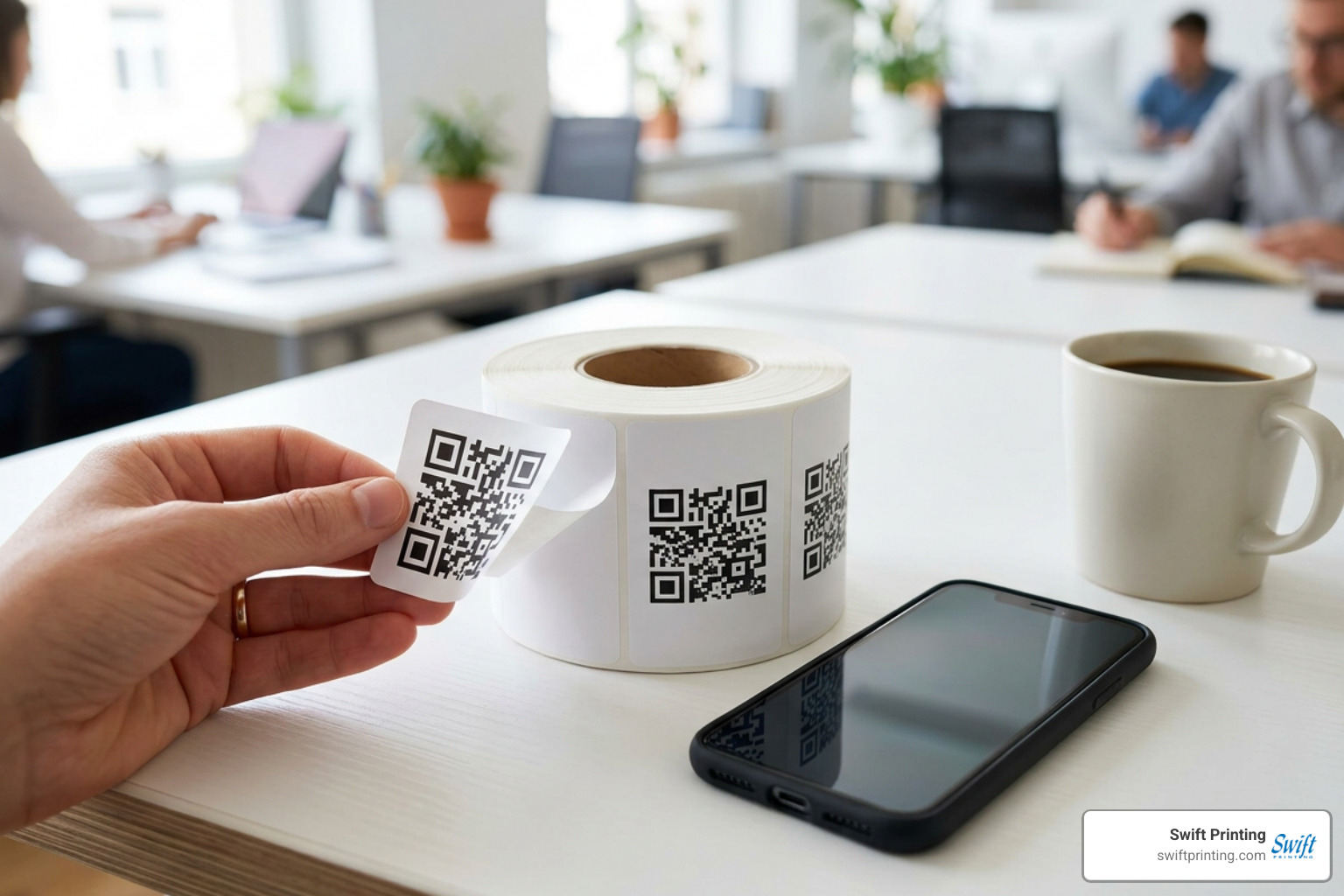
Printing QR code stickers gives your business a simple way to connect physical materials with online action. Add them to product packaging, event materials, mailers, windows, or equipment labels to send people to a menu, video, review page, registration form, digital manual, or special offer.
For an order that works well, provide a tested QR code and choose a sticker built for where it will be used:
- Paper labels work well for short-term indoor uses and packaging.
- Vinyl or BOPP stickers are better for water, handling, and outdoor exposure.
- Matte finishes help reduce glare that can interfere with phone cameras.
- Dynamic QR codes can be updated after printing and can support scan tracking.
- Print the code at least 2 cm by 2 cm for close-range scanning; larger sizes work better outdoors or from farther away.
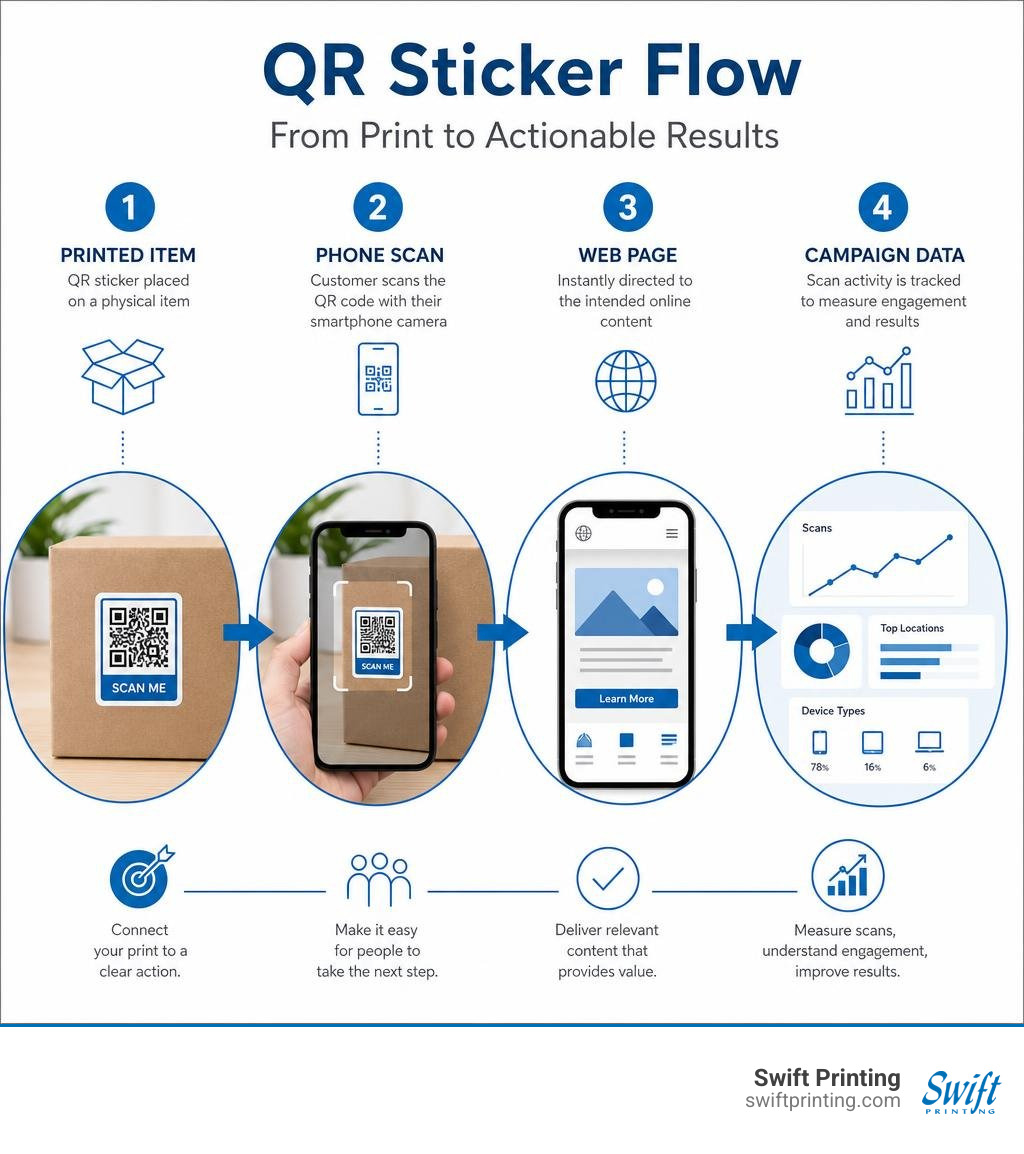
A QR sticker is more than a square on a label. It is a measurable bridge between the printed piece someone holds and the next step you want them to take online. Done well, it can extend the life of existing collateral, reduce friction for customers, and give your campaign a clearer path to results.
I am Jessica Gutowski-Slaydon, president of Swift Printing in Grand Rapids and a third-generation print leader focused on dependable, people-first service. My experience helping organizations plan and produce printed materials informs this guide to printing qr code stickers that look professional, scan reliably, and fit real campaign deadlines.
Understanding QR Code Stickers: Fundamentals, Types, and Sizing
At its core, a Quick Response (QR) code sticker is a physical label printed with a two-dimensional matrix pattern. Designed according to the ISO 18004 standard, this matrix translates encoded digital data—such as web URLs, contact vCards, Wi-Fi login credentials, or plain text—into a sequence of dark and light square modules. When a smartphone camera or optical sensor passes over the label, standard iOS and Android operating systems automatically decode these spatial modules natively without needing third-party scanning apps.
To ensure your printed labels remain functional in real-world environments, QR codes incorporate built-in Reed-Solomon error correction. When creating graphics for sticker production, specifying Level H error correction reserves approximately 30% of the symbol's structure for data recovery. This means that even if a sticker suffers up to 30% physical surface damage, severe scratching, or partial tearing, smartphone cameras can still parse the matrix and successfully trigger the action.
Static vs Dynamic QR Code Stickers
When planning your printing order, choosing between static and dynamic QR code structures is one of the most critical decisions. Both types serve specific operational goals depending on your long-term campaign strategy.
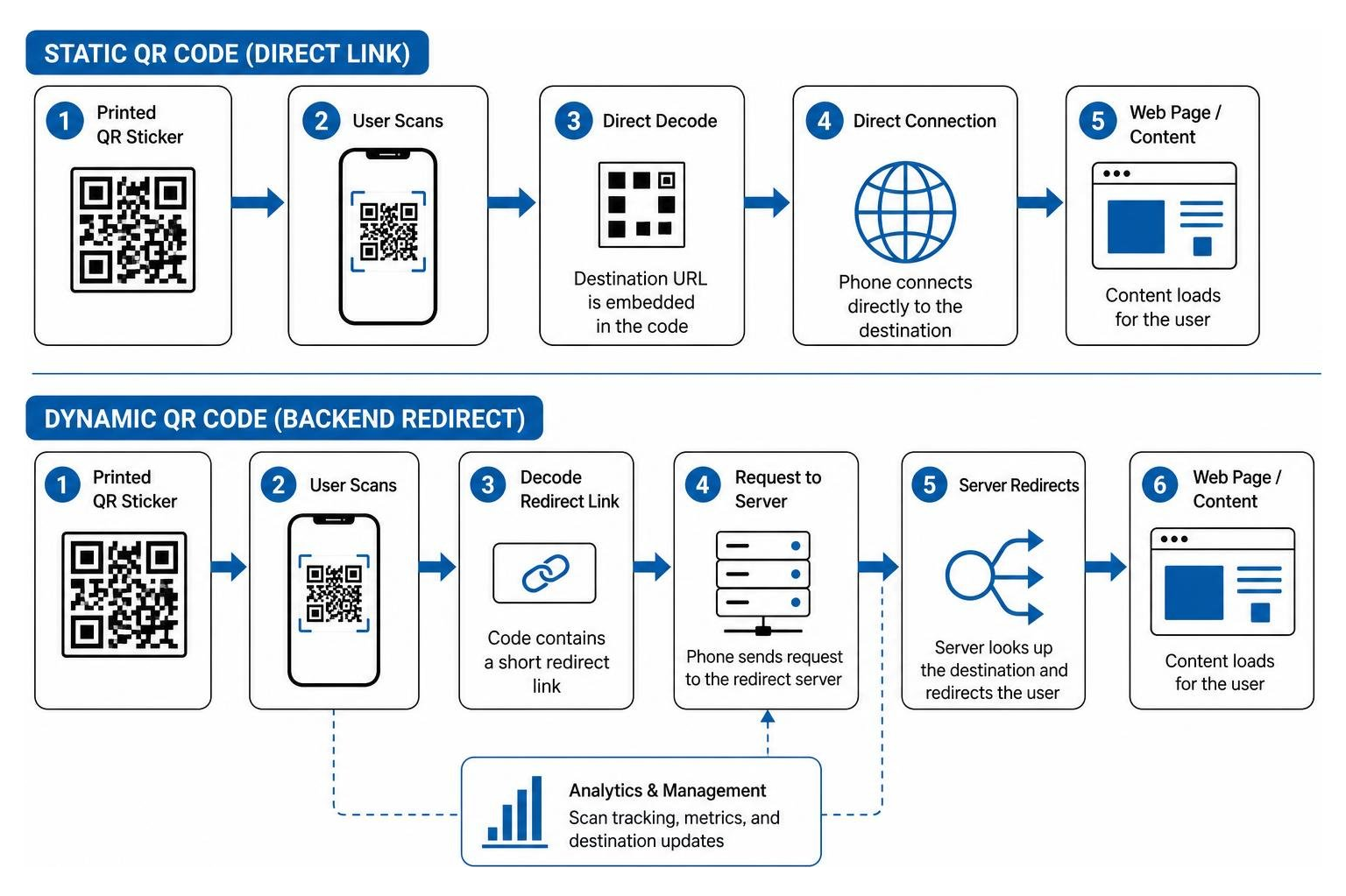
- Static QR Code Stickers: A static code hardcodes destination data directly into the printed matrix pattern. Because the information is directly embedded, no middleman server or redirect service is involved. This offers absolute zero-server data privacy and guarantees that the sticker will never expire as long as the destination server or destination URL remains active. You can generate static codes easily using online tools like a Free QR Code Sticker Maker or vector creation platforms like QRSprint. However, static codes cannot be altered once printed. If your website URL changes, any static QR stickers already applied to physical surfaces will permanently break, requiring full sticker replacement.
- Dynamic QR Code Stickers: A dynamic code embeds a short, lightweight redirect link rather than the final raw destination URL. When a user scans the physical label, the request passes through a central server that instantly redirects the user to your designated target page. This offers two major commercial advantages: post-print destination editing and scan analytics tracking. If your marketing campaign URL changes or a promotional offer ends, you simply change the backend destination link in your account without spending a dime reprinting physical inventory. Tools like QRKIT demonstrate how dynamic stickers allow businesses to update customer journeys across hundreds of deployed products instantly.
Minimum Sizing and Contrast Requirements
A QR sticker that fails to scan is a lost conversion. Preventing camera decoding failures requires strict adherence to sizing, scanning geometry, and optical contrast ratios.
The absolute minimum scannable dimension for printing qr code stickers used at close range (such as handheld retail product labels or packaging inserts) is 2cm × 2cm (0.8 inches square) under good ambient lighting conditions. However, scanning reliability improves dramatically when you calculate your sticker dimensions using the 10-to-1 scan ratio rule: the physical width of the QR matrix should equal roughly one-tenth of the intended physical distance between the user's smartphone camera lens and the sticker surface.
| Intended Scanning Distance | Minimum Matrix Size | Ideal Sticker Application |
|---|---|---|
| Handheld / Arm's Length (~0.2 – 0.3 m) | 2.0 cm × 2.0 cm (0.8" × 0.8") | Retail tags, business cards, packaging inserts |
| Tabletop / Shelf Depth (~0.5 – 1.0 m) | 5.0 cm × 5.0 cm (2.0" × 2.0") | Restaurant menus, retail shelf talkers, counter displays |
| Standing / Eye Level (~1.5 – 2.0 m) | 15.0 cm × 15.0 cm (6.0" × 6.0") | Storefront windows, posters, trade show banners |
| Vehicle / Outdoor Viewing (3.0m+) | 30.0 cm × 30.0 cm (12.0" × 12.0") | Fleet graphics, bumper decals, outdoor signage |
Equally vital is maintaining high visual contrast. Standard smartphone optics rely on stark light reflectivity variations between dark foreground modules and light background elements. Always maintain a minimum color contrast ratio of 40%—ideally dark black or deep indigo modules printed over a solid white or light pastel background. Inverting colors (printing white modules over a dark background) often confuses camera focus algorithms and should be strictly avoided. Lastly, always preserve an unobstructed "quiet zone" margin around all four edges of the code equal to at least 4 module widths to separate the matrix from nearby text or border designs.
Selecting Materials and Finishes for Sticker Production
Selecting the correct sticker substrate determines whether your QR labels survive their operational environment or fail prematurely due to moisture, abrasion, or peeling.
Selecting Substrates for Printing QR Code Stickers
When choosing materials, match the substrate and adhesive characteristics to the target surface and expected lifespan of the application.
- Paper Labels: Standard paper sticker stock is an economical solution ideal for indoor, short-term applications such as high-volume shipping boxes, direct mail inserts, or promotional event handouts. While cost-effective, paper stock offers minimal water resistance and can tear easily under friction.
- Printable Vinyl: White printable vinyl is the gold standard for high-durability labels, vehicle decals, and long-term product branding. Vinyl offers exceptional flexibility, water resistance, and tear resistance, ensuring that your physical labels retain high image sharpness over months or years.
- BOPP (Biaxially-Oriented Polypropylene): Polypropylene film is a rugged plastic substrate highly resistant to moisture, oils, chemicals, and physical abrasion. It is the premier choice for cosmetic containers, refrigerated beverage bottles, and industrial asset tracking labels.
Adhesive selection is equally crucial. Permanent adhesives form a chemical bond designed to last the entire lifespan of the product, preventing tampering or accidental removal. Removable adhesives permit clean removal without leaving sticky residue behind—ideal for temporary promotional overlays on window displays, rental gear, or trade show signage. For more inspiration on choosing materials that elevated brand perception, explore our deep-dive on the power of labels and stickers in building a bold, memorable brand.
Durability, Waterproofing, and Finishes
Physical exposure to rain, friction, and sunlight can degrade printed ink layers, preventing camera sensors from reading individual matrix modules. Applying protective overlaminates or specialty liquid coatings solves this problem:
- UV Lamination: Applying a clear thin-film overlaminate seals the printed ink beneath a protective barrier, preventing fading from solar ultraviolet radiation and granting full waterproof durability for outdoor vehicle stickers or luggage tags.
- Finish Selection (Matte vs. Glossy): While high-gloss finishes make visual graphic elements pop, glossy laminates reflect direct sunlight and harsh overhead lighting. These reflections create direct hot-spot glare across the code surface, blinding camera optics. For maximum scannability under all lighting conditions, a matte finish is strongly recommended because its non-reflective surface diffuses light evenly across the entire matrix.
Designing QR Codes for Optimal Scannability

A functional QR sticker must combine technical accuracy with strong visual appeal so users feel motivated to pull out their phones and scan.
To maximize scan engagement rates, avoid dropping a bare, unbranded square matrix onto your marketing pieces. Enhance the artwork by surrounding the code with a high-visibility visual call-to-action (CTA) frame—such as "Scan Me for 10% Off" or "Scan to View Menu." Integrating your company logo directly into the center of the matrix reinforces trust and brand authority. When inserting central logos, automatically set your generator software to Level H error correction to guarantee that the modules covered by your logo artwork do not compromise camera readability.
Pre-Press File Preparation Guidelines
To guarantee flawless physical production when sending files to a professional commercial press, structure your graphic files according to standard pre-press criteria:
- Vector File Formats: Always supply artwork in vector SVG or EPS formats rather than raster images (such as low-res JPEGs or GIFs). Vector files scale infinitely without pixelation or soft edge blurring, maintaining razor-sharp matrix square boundaries.
- Resolution for Raster Files: If exporting raster images, ensure the artwork resolution is at least 300 DPI at 100% printed scale.
- Color Space Conversion: Digital design applications create files in RGB color mode, whereas commercial presses print using CMYK inks. Convert your files to CMYK before submission to prevent unexpected color shifts during print runs.
- Print Bleed and Safety Margins: Include a standard 3mm (0.125 in) bleed line beyond the final trim edge for die-cut labels, and maintain a quiet zone margin equal to at least 4 module widths around the code matrix.
For detailed walkthroughs on generating source files or preparing graphic layouts, consult our practical guides on how to make a QR code and how to prepare a Canva file for the printer.
Common Pitfalls When Printing QR Code Stickers
- Inverting Color Palettes: Printing light modules over a dark background disrupts smartphone focus mechanisms.
- Insufficient Color Contrast: Using low-contrast color pairs (e.g., light gray modules on a pastel pink background) renders codes unreadable to optical sensors.
- Ignoring the Quiet Zone: Placing graphic text, decorative borders, or image edges directly against the QR matrix perimeter confuses camera boundary detection algorithms.
- Pixelated Raster Artwork: Printing low-resolution 72 DPI web graphics causes blurry module edges that prevent optical cameras from distinguishing module boundaries.
- Failing to Verify Destination Links: Printing thousands of labels with a broken URL or a missing "https://" protocol creates expensive wasted inventory.
Step-by-Step Guide to Printing QR Code Stickers

Executing a successful sticker order involves evaluating production volumes, budget parameters, and physical quality verification.
DIY Home Printing vs Commercial Printing Services
Choosing between desktop DIY printing and commercial production depends on your volume, required finish quality, and environmental durability demands.
- DIY Desktop Printing: Desktop desktop inkjet or laser printers paired with pre-cut adhesive paper sheets offer a low-cost solution for low-volume production (<50 stickers). Producing stickers at home costs approximately $0.15–$0.30 per sticker. However, desktop inkjets lack UV-curing capabilities, making prints vulnerable to smudging, moisture damage, and color fading unless treated with manual clear acrylic spray sealants.
- Commercial Digital Printing: Partnering with a commercial printer unlocks professional-grade digital presses, precise kiss-cut or die-cut shapes, specialized substrates (BOPP, heavy vinyl, metallic stocks), and protective matte lamination. Commercial short-run pricing scales economically from $0.93 to $5.00 per sticker for small runs down to pennies per unit for bulk volume orders.
When your project demands precise color matching and specialized material coatings, review our options for short run digital printing near me or explore our dedicated label printing services.
Testing and Quality Assurance Protocols
Never skip physical testing protocols prior to full production runs. Follow this systematic testing sequence:
- Screen Pre-Test: Perform preliminary test scans directly from your computer monitor using multiple smartphone camera models (both iOS and Android) to confirm that destination links resolve correctly.
- Hard Copy Prototype Test: Print a physical test proof at 100% scale using your target print settings.
- Multi-Lighting Inspection: Scan the physical proof under bright outdoor sunlight, low-light indoor environments, and directly under harsh overhead fluorescent lights to verify that matte finishes prevent glare obstruction.
- Angle and Distance Check: Scan the sticker at extreme side angles and from maximum intended viewing distances to verify camera focal tracking.
High-Impact Placement Strategies for QR Code Stickers
Strategically deploying printing qr code stickers converts ordinary physical touchpoints into high-converting digital gateways.
Business Use Cases and Placement Locations
- Product Packaging & Inserts: Place stickers directly on retail boxes, food containers, or shipping materials to link customers directly to digital user manuals, video assembly guides, warranty registration forms, or reorder pages.
- Direct Mail & Marketing Collateral Overlays: Rather than reprinting expensive brochures or direct mailers when promotional links change, stick updated dynamic QR code overlays directly over outdated printed URLs to instantly modernize your campaign collateral.
- Storefront Windows & Reception Counters: Apply high-contrast window decals at eye level near entrance doors or cash registers, directing foot traffic to Google review collection forms, loyalty program signups, or digital menus.
- Guest Wi-Fi Access: Mount custom Wi-Fi access stickers on conference room tables, guest rooms, or cafe counters, enabling visitors to connect to local networks with a single tap without typing complex passwords.
- Asset Tracking & Equipment Management: Affix rugged vinyl or BOPP labels to company hardware, fleet vehicles, or rental tools to give technicians instant access to maintenance records, service logs, or emergency contact forms.
To discover more ways modern digital press technology elevates commercial marketing tools, explore our full suite of digital printing solutions.
Frequently Asked Questions About QR Code Stickers
What is the minimum scannable size for a QR code sticker?
The minimum reliable physical size for close-range smartphone scanning is 2cm × 2cm (about 0.8 inches square) under good lighting conditions. For longer viewing distances, follow the 10-to-1 scan distance rule: the matrix width should equal approximately one-tenth of the distance between the camera lens and the sticker. Outdoor applications, such as vehicle windscreens or window graphics, should measure at least 4cm × 4cm or larger.
Can dynamic QR code stickers be updated after printing?
Yes. Dynamic QR codes utilize a short redirect URL embedded within the physical matrix pattern. Because the matrix points to a flexible central server routing system, you can log into your management dashboard at any time and change the backend destination web address—even years after the physical stickers have been printed and applied to customer products.
Why is a matte finish recommended over glossy for QR code stickers?
Glossy lamination creates sharp mirror-like light reflections under direct sunlight, spotlights, or smartphone flash units. These hot spots obscure individual matrix modules from camera sensors, triggering scanning failures. A smooth matte finish diffuses direct light evenly across the sticker surface, eliminating specular glare and ensuring seamless camera decoding in any lighting environment.
Conclusion
Printing QR code stickers remains one of the most versatile, cost-effective methods for bridging physical offline touchpoints with dynamic digital experiences. By carefully selecting durable substrates like printable vinyl or BOPP, enforcing high visual color contrast, specifying glare-free matte finishes, and adhering to minimum physical sizing parameters, you ensure that every campaign label delivers a fast, frictionless interaction for your audience.
At Swift Printing, located in Grand Rapids, Michigan, we bring decades of technical printing expertise to every order. As one of only two Certified B Corporations in the printing industry worldwide, we combine state-of-the-art commercial press technologies with a deep commitment to environmental stewardship, sustainable material sourcing, and community-first service.
Whether you need a short run of custom die-cut product labels or thousands of outdoor-grade vinyl equipment stickers, our team is ready to help you execute flawless physical print campaigns. Discover how integrated print technologies can transform your customer engagement by reading our guide on why you should use QR codes in print marketing, or reach out to Swift Printing today to start your next custom label project!